What Is IAM?
By the end of this lesson, you'll be able to:
- Explain what IAM does within an AWS account
- Distinguish authentication ("who are you?") from authorization ("what are you allowed to do?")
- Describe the identity → policy → permission → resource chain that IAM permissions flow through
Prerequisites: Module 1: "The Shared Responsibility Model"
What IAM actually does
Every action taken inside an AWS account — creating a server, reading a file, deleting a database — has to answer two questions before AWS allows it: who is asking, and are they allowed to do this specific thing. IAM is the AWS service responsible for answering both.
Module 1 already introduced one IAM concept in passing — the root user, and the principle of least privilege. This module is where IAM itself becomes the subject, rather than a supporting mention.
Authentication vs. authorization
These two words get used almost interchangeably in casual conversation, but IAM treats them as genuinely separate steps:
- Authentication answers "who are you?" — proving an identity is who it claims to be. Signing in with a username and password, or a workload presenting valid temporary credentials, are both authentication.
- Authorization answers "what are you allowed to do?" — once AWS knows who you are, it still has to check whether this specific identity is permitted to take this specific action on this specific resource.
Being authenticated doesn't automatically mean being authorized. A signed-in, verified IAM user can still be denied a specific action if nothing grants them permission to take it.
The chain every permission flows through
A useful mental model for the rest of this module:
Identity → Policy → Permission → Resource
- An identity (a user, group, or role — all covered in this module) exists within the account.
- A policy — a permission document — is attached to that identity.
- The policy grants (or denies) specific permissions: which actions are allowed.
- Those permissions apply to specific resources — a particular S3 bucket, not "all of S3" by default.
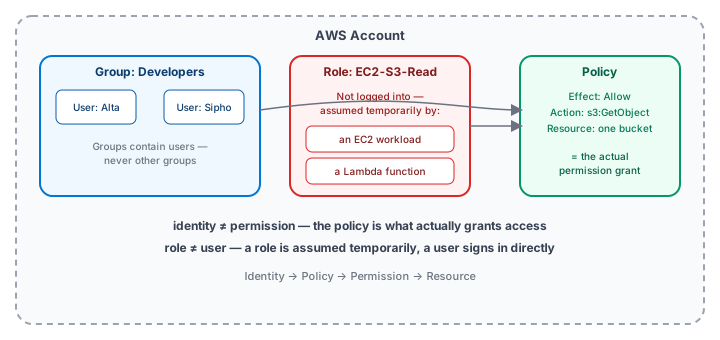
Every lesson from here builds one link in that chain: identities in the next lesson, then policies and permissions, then the discipline of keeping that chain as narrow as possible.
Exercise
For each of the following, decide whether it's an example of authentication or authorization: (1) A developer enters their password and a one-time code to sign in. (2) An already-signed-in developer tries to delete a database and AWS checks whether their identity has permission to do that. (3) An application presents a valid set of temporary credentials before making an API call.
Show hint
Authentication is about proving identity; authorization is about checking what that identity is permitted to do.
What Is IAM? Quiz
My Notes
Log in to keep private notes on this lesson.
Questions about this lesson
No questions yet — be the first to ask.
Log in to ask a question about this lesson.
Summary
IAM (Identity and Access Management) is the AWS service that controls who — or what — can do what, inside an AWS account: it authenticates identities and then authorizes the specific actions each identity is allowed to take.