Security Groups and Elastic IPs
By the end of this lesson, you'll be able to:
- Explain what a security group controls, using inbound/outbound rules, protocols, ports, and sources
- Identify an overly permissive security group rule and explain why it violates least privilege
- Explain what an Elastic IP is and why it matters for an instance with a changing public address
Prerequisites: "Key Pairs and Connecting to EC2"
Security groups: a virtual firewall
A security group controls network traffic allowed to reach (inbound) and leave (outbound) the network interfaces attached to a resource like an EC2 instance. Each rule specifies a protocol (such as TCP), a port (such as 443 for HTTPS), and a source (for inbound) or destination (for outbound) — typically an IP address range.
Nothing is allowed by default beyond what a rule explicitly permits. This is the same least-privilege discipline Module 2 taught for IAM, applied to network traffic instead of API permissions: grant exactly the access a resource needs, and nothing wider.
A web server, configured correctly
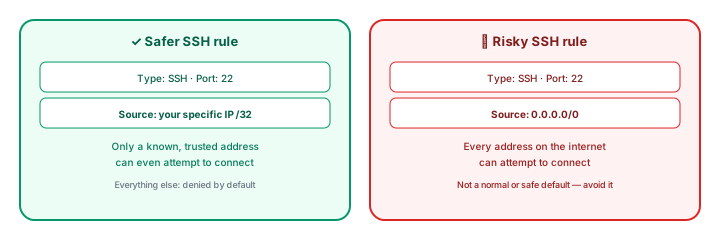
Consider a web server that needs to serve public traffic. A reasonable security group allows inbound HTTP and/or HTTPS traffic from anywhere, since the whole point is public web traffic — but administrative access, like SSH, is a different story entirely. SSH should be restricted to the specific location(s) that genuinely need administrative access, not opened to the entire internet.
Unsafe pattern — don't do this
You will see security groups in the wild that allow SSH inbound from 0.0.0.0/0 — meaning any address on the internet. This is not the normal or recommended configuration. It means anyone, anywhere, can attempt to connect to your instance's SSH port, turning every leaked or weakly-protected credential into an immediate, internet-wide exposure instead of a contained one. Restrict SSH to the specific address range that actually needs it, and revisit that range if it changes.
Elastic IPs: a public address that doesn't change
By default, an EC2 instance's public IP address can change if the instance is stopped and started again. For many purposes that's fine — but if something outside AWS needs to reliably reach your instance at a fixed address (a DNS record, a partner integration), that changing address becomes a real problem.
An Elastic IP is a static public address you allocate and attach to an instance, so it stays the same across a stop/start cycle. It solves a real problem, but it isn't free of cost considerations: an Elastic IP that's allocated to your account but not actively attached to a running instance can have cost implications of its own — one more reason the cleanup discipline later in this module matters, not just for instances themselves.
Exercise
A training EC2 instance's security group currently allows inbound SSH from 0.0.0.0/0 on port 22, and inbound HTTP from 0.0.0.0/0 on port 80. Which rule, if any, is a problem, and how would you fix it while keeping the instance usable as a public web server?
Show hint
One of these two rules is appropriate for a public web server exactly as written; the other is the anti-pattern this lesson warned about.
Security Groups and Elastic IPs Quiz
My Notes
Log in to keep private notes on this lesson.
Questions about this lesson
No questions yet — be the first to ask.
Log in to ask a question about this lesson.
Summary
A security group is a virtual firewall controlling exactly what network traffic is allowed to and from an EC2 instance, and should be configured with the same least-privilege discipline Module 2 taught for IAM permissions; an Elastic IP is a fixed public address you can attach to an instance so it doesn't change across a stop/start cycle.