Starting, Stopping, and Pricing EC2 Instances
By the end of this lesson, you'll be able to:
- List the main EC2 instance lifecycle states and what each one means
- Explain the difference between stopping and terminating an instance
- Explain why a stopped instance can still have ongoing cost implications
Prerequisites: "EBS: Elastic Block Store"
The lifecycle states
An EC2 instance moves through a small number of states:
- Launch — an instance is created from an AMI and instance type, and begins starting up.
- Running — the instance is active and reachable (subject to its security group).
- Reboot — the operating system restarts, but the instance stays the same instance — same storage, same addresses (unless configured otherwise).
- Stop — the instance shuts down but is retained — its root volume (by default) persists, and it can be started again later.
- Start — a stopped instance resumes running again.
- Terminate — the instance is permanently deleted. This cannot be undone.
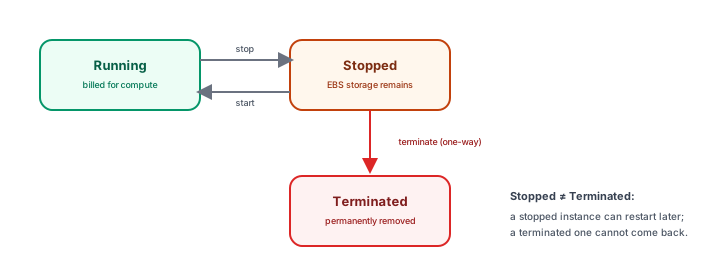
Stop ≠ Terminate — this distinction matters
This is worth stating as plainly as possible: stopping an instance is not the same as terminating it, and confusing the two is a genuinely consequential mistake.
- Stop pauses the instance. It still exists, its configuration is preserved, and (depending on setup) its storage persists — you can start it again later and pick up where you left off.
- Terminate permanently deletes the instance. There is no "start it again" afterward — a terminated instance is gone.
If your intention is "I'm done experimenting and want this instance and everything attached to it gone," stopping is not the same accomplishment as terminating — this module's closing lesson covers exactly what "actually gone" requires.
A stopped instance can still cost money
A common beginner assumption is that stopping an instance stops all related charges. This isn't reliably true. Stopping typically halts the compute charges the running instance itself was generating — but resources attached to it, like its EBS root volume, and resources allocated for it, like an Elastic IP, don't necessarily stop having cost implications just because the instance itself is paused.
This lesson deliberately avoids stating specific prices — check your AWS account's current Free Tier eligibility and the current EC2 pricing page before treating any configuration as "free" or "harmless while stopped."
Exercise
A learner finishes a training exercise and stops their EC2 instance, believing this fully eliminates any further cost. Based on this lesson, explain what's incomplete about that belief, and name one other resource type (introduced earlier in this module) that could still have cost implications after the instance is stopped.
Show hint
Two earlier lessons in this module each introduced a resource that has its own independent cost story.
Starting, Stopping, and Pricing EC2 Instances Quiz
My Notes
Log in to keep private notes on this lesson.
Questions about this lesson
No questions yet — be the first to ask.
Log in to ask a question about this lesson.
Summary
An EC2 instance moves through a small set of lifecycle states — launched, running, stopped, and terminated, with reboot and restart along the way — and confusing "stop" with "terminate" is one of the most consequential mistakes a beginner can make, since a stopped instance is paused, not gone, and related resources can keep incurring cost regardless of which one you chose.