Amazon S3: Buckets and Objects
By the end of this lesson, you'll be able to:
- Explain what object storage is and how it differs from a traditional filesystem or local disk
- Describe the account → bucket → object → key hierarchy S3 is organized around
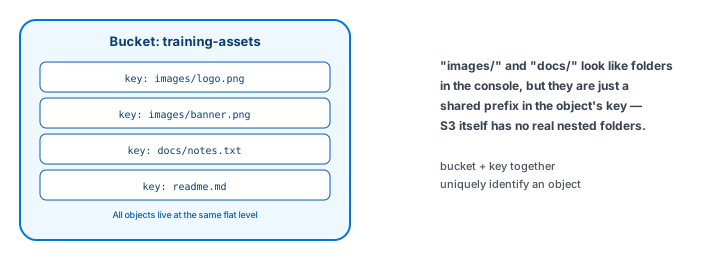
- Explain why S3 "folders" are a key-prefix convention rather than real directories
Prerequisites: Module 3: "Cleaning Up: Terminating EC2 Resources Safely"
S3 is object storage, not a disk
Amazon S3 (Simple Storage Service) stores objects — files, along with some metadata describing them — inside containers called buckets. This is worth stating plainly up front: S3 is object storage, not a traditional filesystem. It doesn't behave like a local disk you mount and read/write to at the byte level; you store a whole object, and you retrieve a whole object, addressed by a unique identifier called its key.
Common, everyday uses of S3 include application assets (images, videos), uploaded documents, backups, log files, static website content, and the inputs and outputs of data-processing jobs — anything that fits the "store a file, retrieve a file" pattern.
The hierarchy: account → bucket → object → key
Every object lives inside exactly one bucket, and a bucket lives inside your AWS account, tied to a specific Region (the same Region concept from Module 1 — where the bucket lives affects latency to your users, and is a decision worth making deliberately, not by default). Within a bucket, every object is identified by its key — a unique string that acts as the object's address.
A key like customers/123/documents/invoice.pdf looks like a file path with folders, and S3's Console displays it that way for convenience — but there's no real "customers" directory or "123" subdirectory underneath it. The key is a single string containing forward slashes; S3 uses that convention to display something folder-like, without actually implementing nested directories the way a traditional filesystem does. This distinction rarely matters for basic use, but it matters the moment you start reasoning about performance or bulk operations across "a folder" of objects — you're really operating on every object whose key happens to share a prefix.
Durability and availability, without the marketing
S3 is designed to be highly durable (your data surviving over time) and highly available (accessible when you need it) by storing data redundantly across the underlying infrastructure. This lesson deliberately doesn't repeat specific percentage claims — those numbers are Amazon's own published figures, and belong in AWS's own documentation, not memorized here. The practical takeaway for a beginner: S3 is built for exactly the "store it and trust it's still there later" use case that makes it a reasonable default for backups and important files, without needing you to manage redundancy yourself.
Bucket naming: yours has to be unique
S3 bucket names follow AWS-defined naming rules and, importantly, share a namespace — a bucket name has to be unique in ways that go beyond just your own account. Don't hardcode a name likely to collide with someone else's bucket. A safe pattern for training purposes: quarrydev-training-UNIQUE_SUFFIX, where you replace UNIQUE_SUFFIX with your own non-sensitive unique value (never a real customer or company identifier) — this lesson uses that exact placeholder pattern throughout the rest of this module.
Exercise
A colleague refers to an S3 bucket as "basically a shared network drive." Using what this lesson covered, explain in 2–3 sentences what's misleading about that comparison, and what S3's key-based addressing actually gives you instead.
Show hint
Think about what a real network drive lets you do (in-place partial edits, true nested directories) that S3's object model doesn't work the same way.
Amazon S3: Buckets and Objects Quiz
My Notes
Log in to keep private notes on this lesson.
Questions about this lesson
No questions yet — be the first to ask.
Log in to ask a question about this lesson.
Summary
Amazon S3 is object storage — files (objects) stored inside containers (buckets) and addressed by a unique key — organized around a flat account → bucket → object hierarchy rather than the nested directory structure a traditional filesystem uses.