Storage Classes, Versioning, and Lifecycle Rules
By the end of this lesson, you'll be able to:
- Explain the decision model behind choosing an S3 storage class based on access pattern
- Explain what S3 Versioning protects against, and why deleting the current version does not mean every version is gone
- Design a simple lifecycle rule for a described, aging dataset
Prerequisites: "S3 Permissions and Bucket Policies"
Storage classes: a decision about access pattern, not a checklist
S3 offers multiple storage classes, each suited to a different access pattern. Rather than memorizing a specific current list (AWS periodically adjusts its exact class offerings), learn the underlying decision model:
- Frequently accessed data — content read often, where fast, unrestricted access matters most.
- Infrequently accessed data — content kept available but rarely read, where lower storage cost matters more than instant, unrestricted retrieval.
- Archive data — content kept for long-term retention, rarely if ever accessed, where storage cost is minimized aggressively in exchange for slower or more limited retrieval.
- Changing or unknown access patterns — some storage classes exist specifically to handle data whose access pattern isn't predictable, shifting objects between tiers automatically based on actual usage.
These classes differ along a few consistent dimensions: storage cost, retrieval cost, access characteristics (how quickly and how easily you can get the data back), and sometimes minimum-duration considerations (a cost implication for deleting or transitioning data before a minimum retention period). This lesson deliberately avoids quoting current prices — check AWS's current S3 pricing page and each class's specific terms before choosing one for real data.
Versioning: protection against "oops"
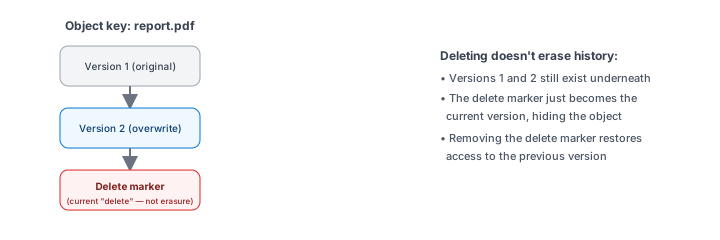
S3 Versioning, once enabled on a bucket, keeps every version of an object rather than silently overwriting or losing the previous one. Upload a new version of the same key, and the old one doesn't disappear — it's retained, addressable by its own version ID. "Delete" an object with Versioning enabled, and rather than immediately erasing it, S3 typically adds a delete marker — a marker that makes the object appear gone in normal listings, while the actual prior versions remain in the bucket, still retrievable if you know to look for them.
This is genuinely useful for recovering from an accidental overwrite or deletion — but it has a real, important cost consequence worth internalizing now, before you reach this module's cleanup section: deleting the currently visible version of an object does not mean every stored version has disappeared. A bucket that "looks empty" after some deletions can still be storing — and still be billed for — every prior version underneath.
Lifecycle rules: automating what happens as data ages
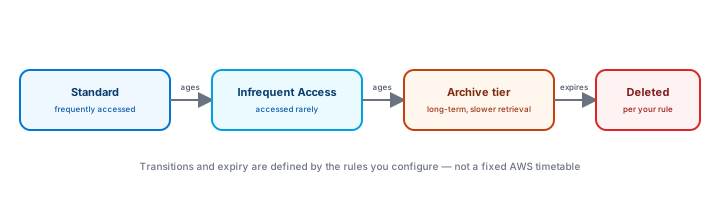
A lifecycle rule automates transitions and expiration for objects as they age, instead of managing that by hand. Consider application logs as a worked example:
- Recent logs stay in a frequently-accessible storage class, since they're the ones most likely to be actively investigated.
- Older logs can transition to a lower-cost storage class once they're rarely needed, but might still matter occasionally.
- Very old logs can be configured to expire entirely, once they're old enough that keeping them serves no ongoing purpose — according to whatever retention period the organization has determined is appropriate.
That last point is deliberate: this lesson is not legal advice, and doesn't state a "correct" retention period — organisations must determine their own applicable retention and compliance requirements themselves, and configure lifecycle rules to match, rather than picking an arbitrary number.
A lifecycle rule can also manage previous versions specifically — for example, expiring old versions of a Versioned object after some period, which is one practical way to keep Versioning's recovery benefit without retaining every past version forever.
Exercise
A bucket has Versioning enabled. A learner deletes an object they no longer want, checks the bucket listing, sees the object is gone, and considers the cleanup complete. What did they miss, based on this lesson? Then design a simple lifecycle rule (in plain English) for an application-logs bucket where logs older than a defined period should move to a lower-cost class, and logs older than a longer defined period should expire.
Show hint
The deletion made the object disappear from normal listings — that's not quite the same as every stored version being gone.
Storage Classes, Versioning, and Lifecycle Rules Quiz
My Notes
Log in to keep private notes on this lesson.
Questions about this lesson
No questions yet — be the first to ask.
Log in to ask a question about this lesson.
Summary
S3 storage classes trade cost and retrieval characteristics based on how often data is accessed; Versioning protects against accidental overwrites and deletions by keeping prior copies (which has its own storage-cost implications); and lifecycle rules automate moving or expiring objects as they age, based on requirements the organization itself must define.