Comparing AWS Storage Services
By the end of this lesson, you'll be able to:
- Summarize what S3, EBS, and EFS are each best suited for
- Choose an appropriate storage service for a described application requirement
- Explain why the choice should be driven by access pattern, not by which service name is most familiar
Prerequisites: "EBS vs. EFS: Choosing the Right File Storage"
The three models, side by side
This module has now covered all three AWS storage models this course focuses on. Bringing them together:
S3 — object storage. Good for documents, images, backups, logs, static website assets, and large datasets accessed as discrete objects rather than a live, mounted filesystem.
EBS — block storage. Good for an EC2 instance's own disks: the operating system volume, and application storage that behaves like a traditional attached disk, used by one instance at a time.
EFS — shared file storage. Good for shared Linux filesystem use cases specifically — multiple compute instances that genuinely need concurrent access to the same files and directories.
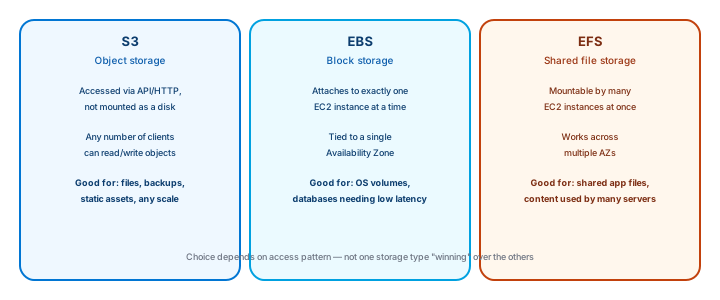
Choose by access pattern, not by familiarity
The single most important habit this module can leave you with: choose storage based on the application's actual access pattern and requirements, not simply because a service name is the one you've heard of most. A learner who defaults to "put everything in S3" or "just attach an EBS volume" without asking what the workload actually needs will eventually build something that technically works but fits poorly — expensive, awkward, or fragile in ways a five-minute access-pattern analysis would have avoided.
A quick gut-check that holds up well in practice: is this a discrete file you're storing and retrieving as a whole (S3)? Is this a disk one specific instance needs (EBS)? Do multiple things need to read and write the same files at once (EFS)? Most real decisions fall out cleanly once the question is framed that way.
Exercise
For each scenario, choose S3, EBS, or EFS, and briefly justify your choice: (1) storing daily database backup files, (2) the root operating-system volume for a single EC2 instance, (3) a shared upload directory that five application servers all need to read and write to simultaneously.
Show hint
Ask, for each one: is it a discrete stored file, a single instance's disk, or genuinely shared concurrent access?
Comparing AWS Storage Services Quiz
My Notes
Log in to keep private notes on this lesson.
Questions about this lesson
No questions yet — be the first to ask.
Log in to ask a question about this lesson.
Summary
S3 (object storage), EBS (block storage), and EFS (shared file storage) solve genuinely different problems, and choosing between them should come from the application's actual access pattern and requirements, not from defaulting to whichever service happens to be most familiar.