Route Tables and the Internet Gateway
By the end of this lesson, you'll be able to:
- Explain how a route table matches a packet's destination to a target
- Read a simple route table containing a local route and a default route
- Explain what an Internet Gateway does and does not do on its own
Prerequisites: "Public and Private Subnets"
A route table: destination, meet target
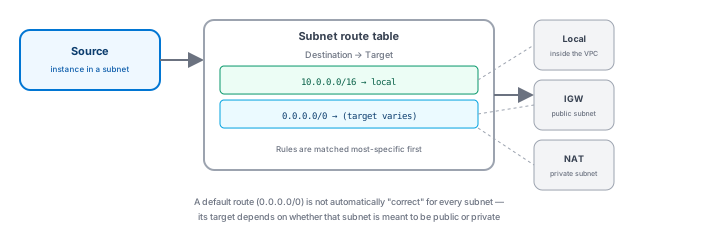
Every subnet is associated with a route table — a list of rules, each one pairing a destination (an address range) with a target (where matching traffic should go). When a packet leaves a resource in that subnet, its destination address is checked against the table, and the most specific matching rule decides where it's sent.
Two rules worth knowing by name
Two fictional example rules illustrate the pattern every VPC route table follows:
10.0.0.0/16 → local— traffic destined for anywhere inside the VPC's own range stays inside the VPC, routed directly ("local"), never leaving it.0.0.0.0/0 → Internet Gateway— traffic destined for anywhere else (the "default route," matching literally everything not covered by a more specific rule) is sent to whatever target this rule names.
This second rule is exactly where public and private subnets diverge: a public subnet's default route points at an Internet Gateway; a private subnet's route table simply doesn't have that route at all (or, as the next lesson covers, points somewhere else entirely).
Don't treat an internet default route as correct everywhere
It's tempting to assume every subnet should have a 0.0.0.0/0 → Internet Gateway route "just in case" — this is exactly the wrong instinct. Whether that specific route belongs in a given subnet's table depends entirely on whether that subnet is meant to support direct internet reachability. A private subnet holding a database should not carry this route; adding it "for convenience" is precisely the kind of unnecessary exposure Module 2's least-privilege principle warned against, applied here to network routing instead of IAM permissions.
The Internet Gateway: necessary, but not sufficient on its own
An Internet Gateway (IGW) is a component attached to a VPC that enables internet connectivity patterns for that VPC. But attaching one doesn't, by itself, make anything public: a resource still needs (a) a route from its subnet's table pointing at the IGW, and (b) suitable addressing on the resource itself. Skipping either one means the IGW being attached changes nothing for that specific resource — routing and resource configuration still matter, exactly as the previous lesson stressed.
Exercise
A private subnet holding a database currently has no 0.0.0.0/0 route in its route table. A teammate proposes adding one "in case we need internet access from the database later." Using this lesson's reasoning, explain why this isn't a good default, and what should happen instead if a genuine, specific need arises later.
Show hint
Think about Module 2's least-privilege principle, applied here to a network route instead of an IAM permission.
Route Tables and the Internet Gateway Quiz
My Notes
Log in to keep private notes on this lesson.
Questions about this lesson
No questions yet — be the first to ask.
Log in to ask a question about this lesson.
Summary
A route table decides where a subnet's traffic goes by matching its destination address against a list of rules, each pairing a destination with a target — an Internet Gateway is one such target, attached to the VPC and enabling internet connectivity patterns, but only in conjunction with the right route and the right resource configuration.