Containers on AWS: Concepts and Docker Basics
By the end of this lesson, you'll be able to:
- Explain what a container is and how it differs from a virtual machine
- Distinguish a container image from a running container
- Explain why a container should not be treated as durable application storage
Prerequisites: Module 8: "Project: Build a Basic Asynchronous Workflow"
What a container actually is
A container packages an application together with the specific dependencies (libraries, runtime, configuration) it needs to run, in a way that behaves consistently wherever it's run. This solves a genuinely old, genuinely common problem: "it works on my machine" — a container carries its own dependencies with it, instead of depending on whatever happens to already be installed on the machine running it.
Containers versus virtual machines
A virtual machine runs a hypervisor on physical hardware, and each virtual machine on top of it runs its own complete guest operating system, with the application running inside that guest OS. A container, by contrast, runs on a container runtime sitting on a host, and each container shares the underlying host OS kernel rather than running its own separate operating system.
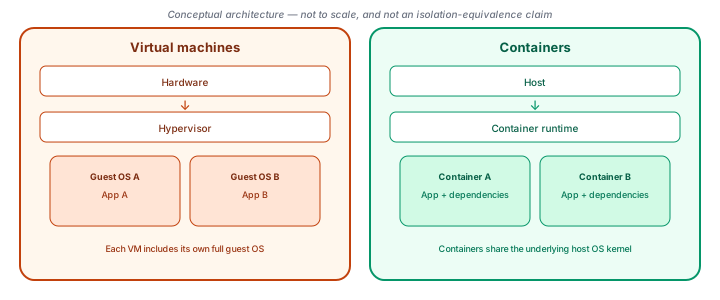
The practical consequence: containers are typically lighter weight and faster to start than a full virtual machine, because they don't need to boot an entire separate operating system — but that same shared-kernel design means a container's isolation model is genuinely different from a VM's, not simply "the same thing, smaller."
Image versus container: template versus running instance
This is worth stating precisely, because the two terms get used interchangeably in casual conversation: a container image is a packaged, immutable template — application code, dependencies, and configuration, bundled together. A container is a running instance created from an image.
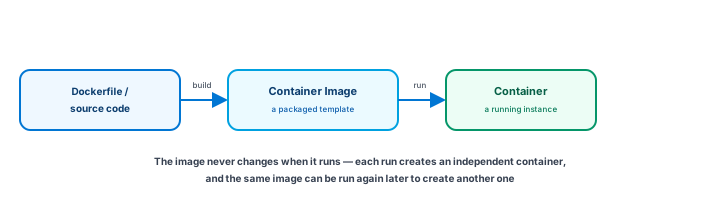
Docker is the tool most commonly associated with building and running containers this way. A Dockerfile is a text file describing how to build an image — what base to start from, what files to copy in, and what command to run when a container starts from it. A short, deliberately simple, educational-only example:
FROM php:8.3-cli

WORKDIR /app

COPY . .

CMD ["php", "artisan", "serve", "--host=0.0.0.0"]
This lesson doesn't walk through the full Docker CLI — the beginner-level goal is recognizing the shape (a Dockerfile builds an image, an image runs as a container), not memorizing every command. And to be direct about the example above: this is a minimal teaching illustration, not a production-ready Laravel deployment — a real production image would need considerably more consideration (dependency installation, a proper web server, configuration handling) than fits in a beginner-level example.
A container is not durable storage
This is worth stating directly, the same way Module 7 stated it for Lambda's execution environment: a container's own local filesystem should not be treated as durable application storage. When a container restarts or is replaced — which happens routinely, as later lessons in this module cover — anything written only to its own local filesystem can disappear with it.
Durable application state belongs in a service built for it: S3 (Module 4) for files and objects, EFS (Module 6) for shared file storage across multiple running containers, EBS where the architecture genuinely calls for attached block storage, or RDS/Aurora/DynamoDB (Module 5) for structured data. A container should read whatever state it needs from one of those services, and write back to one of them — never assume anything written only to its own local disk survives past that specific container's lifetime.
Exercise
A colleague says "a container image and a running container are basically the same thing, just different words for it." Using this lesson's distinction, explain what's actually different between the two, and give an example of something that could be true of one specific running container but isn't true of the image it came from.
Show hint
Think about what happens to data written only inside one running container, versus what the image it was created from still looks like afterward.
Containers on AWS: Concepts and Docker Basics Quiz
My Notes
Log in to keep private notes on this lesson.
Questions about this lesson
No questions yet — be the first to ask.
Log in to ask a question about this lesson.
Summary
A container packages application code and its dependencies together, sharing the host operating system's kernel rather than running a full separate guest OS the way a virtual machine does; a container image is the packaged template, and a container is a running instance created from it, which is why it should never be treated as durable storage for application data.