Secrets Management with AWS Secrets Manager
By the end of this lesson, you'll be able to:
- Explain why a hardcoded credential in source code is a serious, hard-to-undo risk
- Describe what a managed secrets mechanism like AWS Secrets Manager provides conceptually
- List the places a real credential must never appear
Prerequisites: "Encryption Basics on AWS"
Why a hardcoded credential is a genuinely serious mistake
This course has repeated one warning in almost every module: never embed a real credential in code, a container image, or anywhere else it might be copied, committed, or distributed. This lesson explains precisely why that warning is worth taking so seriously.
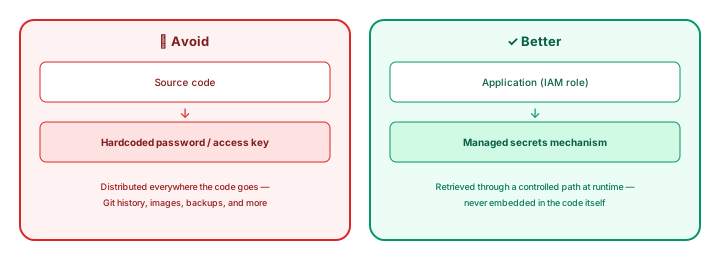
A credential baked into source code ends up in Git history (even after being "removed" in a later commit), in every clone of that repository, in every container image built from it, and potentially in build logs or backups — all without the credential's owner necessarily realizing how far it has spread. Rotating or revoking it after the fact doesn't undo any use that already happened while it was live.
AWS Secrets Manager: a managed home for secrets
AWS Secrets Manager provides a managed mechanism for storing secrets — database credentials, API keys, and similar sensitive values — and retrieving them at runtime, rather than embedding them in code. An application's own IAM role (Module 2's least privilege, applied here) can be granted permission to retrieve a specific secret it needs, with access controlled and auditable through IAM rather than through whoever happens to have read access to a repository or an image.
This lesson doesn't require building a full Secrets Manager integration — the concept to take away is the shape: secrets live in a managed, access-controlled store; applications retrieve them at runtime through their own identity, never through a value written into their own source.
Where a real credential must never appear
Worth restating plainly, gathering this course's repeated warnings into one list: a real credential should never appear in Git (even a private repository), a Docker image, source code of any kind, frontend JavaScript, a screenshot, or a course exercise submission. Every one of these is something that gets copied, cloned, cached, or shared in ways the original author often can't fully control after the fact.
Exercise
A developer commits a database password directly into a configuration file, pushes it to a private GitHub repository, then removes it in a later commit. Using this lesson's reasoning, explain why removing it in a later commit does not make the credential safe again, and describe what should happen instead — both to fix the immediate exposure and to prevent the same mistake going forward.
Show hint
Think about what still exists in the repository's history even after a file is changed in a later commit, and what AWS Secrets Manager offers as the better pattern going forward.
Secrets Management with AWS Secrets Manager Quiz
My Notes
Log in to keep private notes on this lesson.
Questions about this lesson
No questions yet — be the first to ask.
Log in to ask a question about this lesson.
Summary
Hardcoding a password or access key directly into source code, a container image, or a public post distributes that credential everywhere the artifact goes, indefinitely — AWS Secrets Manager provides a managed mechanism for storing and retrieving secrets at runtime instead, so an application's IAM role controls access to the secret rather than the secret being embedded in the code itself.