What Is Amazon EC2?
By the end of this lesson, you'll be able to:
- Explain what Amazon EC2 provides and where it sits among the AWS service categories introduced in Module 1
- Contrast EC2 with owning physical servers, and with more heavily managed AWS services
- Explain why EC2 gives more control at the cost of more customer responsibility
Prerequisites: Module 2: "Exercise: Create a Restricted IAM User"
EC2 in one sentence
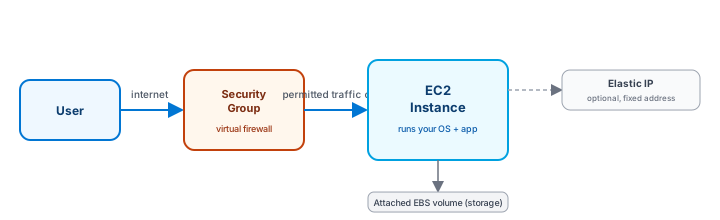
Amazon EC2 (Elastic Compute Cloud) rents you a virtual server — called an instance — that behaves like a real computer: it boots an operating system, runs whatever software you install, and keeps running until you stop it. Module 1 introduced "compute" as one of AWS's broad service categories; EC2 is the most direct, general-purpose way to get compute on AWS.
EC2 vs. owning a physical server
Everything Module 1 taught about cloud computing applies directly here. Owning a physical server means buying it, racking it, powering it, cooling it, and replacing it when it fails — all before it runs a single line of your application code. An EC2 instance skips every one of those steps: you request one, and a few minutes later it's running, ready for you to configure. When you no longer need it, you stop paying for it — a decision that used to require selling or repurposing physical hardware.
Why EC2 means more responsibility, not less
Recall the Shared Responsibility Model from Module 1: the more a service manages for you, the more of the operational burden shifts to AWS. EC2 sits toward the "raw" end of that spectrum. AWS handles the physical server, the power, the networking hardware, and the virtualization layer underneath — but once your instance is running, you are responsible for the operating system, its security patches, the software you install, and how you configure network access to it.
This is a deliberate trade-off, not a flaw: EC2 gives you the flexibility to run almost anything, in exchange for owning almost all of the "in the cloud" side of the Shared Responsibility line for whatever you put on it. Later modules introduce more managed compute options (Lambda, containers) that trade away some of that flexibility for less operational burden — EC2 is where this course starts because it's the most direct, most controllable starting point.
The lifecycle, at a glance
An EC2 instance moves through a small number of states — launched, running, stopped, and eventually terminated — each with real consequences for both your application and your AWS bill. This lesson only names them; Lesson 6 covers the lifecycle in the depth it deserves, because one distinction in it (stop vs. terminate) is one of the most consequential things to get right as a beginner.
Exercise
A small company is deciding between running their application on a physical server they'd buy and install in their own office, versus an Amazon EC2 instance. List two responsibilities that move from the company to AWS if they choose EC2, and one responsibility that stays with the company either way.
Show hint
Think about physical hardware and power versus the operating system and application configuration.
What Is Amazon EC2? Quiz
My Notes
Log in to keep private notes on this lesson.
Questions about this lesson
No questions yet — be the first to ask.
Log in to ask a question about this lesson.
Summary
Amazon EC2 (Elastic Compute Cloud) provides virtual servers — called instances — that you configure and manage yourself, giving far more control than a fully managed service but also making you responsible for far more of the operational work.