Instances, Instance Types, and AMIs
By the end of this lesson, you'll be able to:
- Explain the mental model behind EC2 instance type families, without memorizing a specific current list
- Choose an appropriate instance type category for a described workload
- Distinguish an AMI (a template) from the instance created from it
Prerequisites: "What Is Amazon EC2?"
Instance types: matching hardware shape to workload
Every EC2 instance has an instance type — a specific combination of virtual CPU, memory, and network capacity. AWS groups instance types into families by the shape of workload they're built for. This lesson teaches the families conceptually rather than any specific current list, since AWS adds and retires specific instance types over time:
- General purpose — a balanced mix of compute and memory; a sensible default starting point for most web applications and APIs until you have a specific reason to move away from it.
- Compute optimized — more CPU relative to memory; fits CPU-heavy processing like batch computation or high-throughput data transformation.
- Memory optimized — more memory relative to CPU; fits workloads that hold large datasets in memory, like certain in-memory databases or large-scale caching.
- Storage optimized — built around fast, high-volume local storage access; fits workloads doing heavy, sustained disk I/O.
- Accelerated computing — includes specialized hardware such as GPUs; fits machine learning training or graphics-intensive workloads, where relevant.
Choosing by workload characteristics, not by guessing
The practical skill isn't memorizing exact instance type names — AWS's specific catalogue changes over time — it's reading a workload's characteristics and mapping them to a family:
- A typical web application or API, without unusual demands, starts with general purpose — you can always move to a more specialized family later if a real bottleneck shows up.
- A process doing heavy CPU-bound computation, with modest memory needs, points toward compute optimized.
- A workload that needs to hold a large amount of data in memory at once — well beyond what a general-purpose instance offers — points toward memory optimized.
The right approach in practice: start with the family that matches your workload's dominant characteristic, and adjust based on real, measured behavior rather than guessing upfront.
AMIs: the template, not the instance
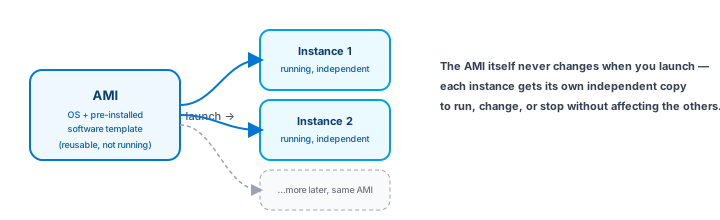
An AMI (Amazon Machine Image) is a template containing an operating system and, optionally, pre-installed software — it's what an instance is launched from, not the instance itself. Think of the AMI as a blueprint and the instance as the building constructed from it: you can launch many separate instances from the same AMI, and each one runs independently once it exists.
AMIs come from a few sources: AWS-provided images (common Linux distributions, Windows Server), the AWS Marketplace (vendor-published images, sometimes with additional licensing), community images, and custom AMIs you build yourself from a configured instance. One practical detail worth knowing early: an AMI is built for a specific processor architecture, and the instance type you launch it on has to be compatible with that architecture — mismatching the two is a common beginner error worth checking for before launching.
Exercise
For each workload, choose the instance type family that best fits, and briefly say why: (1) a typical customer-facing web application with no unusual resource demands, (2) a nightly batch job that performs heavy numerical computation, (3) an in-memory cache holding a very large dataset. Then explain, in one sentence, the difference between an AMI and an EC2 instance.
Show hint
Match each workload to whichever resource (CPU vs. memory) it depends on most heavily.
Instances, Instance Types, and AMIs Quiz
My Notes
Log in to keep private notes on this lesson.
Questions about this lesson
No questions yet — be the first to ask.
Log in to ask a question about this lesson.
Summary
An instance type determines the compute, memory, and storage balance of an EC2 instance, grouped into families suited to different workload shapes; an AMI (Amazon Machine Image) is the template — operating system plus initial software — that an instance is launched from, and is not the instance itself.