Project: Build a Simple Application Data Store
By the end of this lesson, you'll be able to:
- Design a simple relational data store for a described application, applying this module's reasoning
- Apply this module's Backup ≠ High Availability distinction to a concrete design decision
- Apply cost-awareness and cleanup discipline to a training RDS instance and a training DynamoDB table
Prerequisites: "Backups, Availability, and Scaling"
Before you begin: two valid paths, and a real cost decision
As with earlier hands-on projects in this course, you can follow this directly in a real AWS account or read through it without creating anything. If you do create a real RDS instance or DynamoDB table, check your AWS account's current Free Tier eligibility and the current RDS/DynamoDB pricing pages first — per Lesson 1's caution against assuming Free Tier means unconditionally free, don't assume a small training database is automatically free.
The scenario
Karoo Retail (from Lessons 2 and 5) wants a simple data store for a new internal tool: tracking staff training records, where each record belongs to exactly one employee, and the team wants to run occasional reports joining employees and their completed courses.
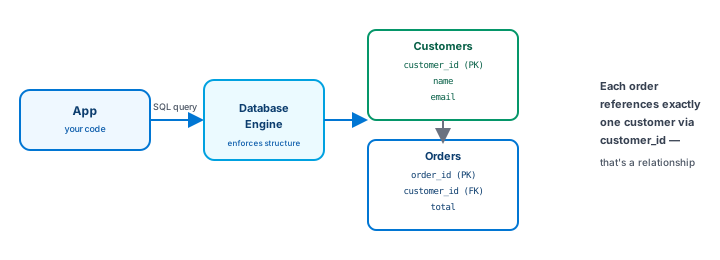
Following Lesson 5's reasoning: relationships between two entities, plus reporting needs that aren't fully fixed upfront, point toward a relational data store — Amazon RDS, per Lesson 2.
Designing the data store
- Choose the database family — relational (RDS), following the reasoning above.
- Sketch the tables — an
Employeestable (one row per employee) and aTrainingRecordstable (one row per completed course, referencing the employee it belongs to). - Decide on availability — would this internal tool need a Multi-AZ deployment from day one, or is a single-instance setup acceptable while it's new and low-traffic? (There's a reasonable case for either, depending on how critical the tool is — the point is making the decision deliberately, not by default.)
- Decide on backups, separately from availability — per Lesson 6, backups are a separate decision from Multi-AZ; even a single-instance, non-Multi-AZ setup should have automated backups configured, since backups protect against a different kind of problem than availability does.
A DynamoDB comparison, for contrast
Now consider a different piece of the same tool: logging every time an employee opens the training portal, purely for a simple "last accessed" lookup by employee ID, with no reporting needs across other attributes.
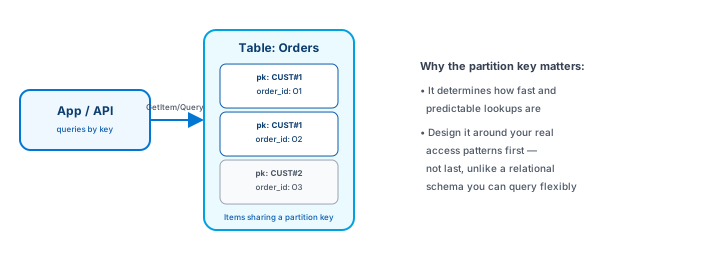
This narrower piece — a known key, a single dominant access pattern, no relationship querying — is a reasonable DynamoDB fit, even though the main training-records data store is relational. Real systems often make this kind of per-piece decision rather than forcing every part of an application into one database family.
Cost & Cleanup
If you created real resources for this project, work through both checklists before considering it finished — don't assume either "cleans itself up":
RDS cleanup:
- Stop or delete the training RDS instance once you're done experimenting.
- Review any automated snapshots or manual snapshots you created — snapshots can persist (and have cost implications) after the instance itself is gone.
- Review any additional storage allocated to the instance.
- Confirm, by checking the RDS dashboard directly, that nothing training-related remains — the same "verify, don't assume" discipline Module 3 taught for EC2.
DynamoDB cleanup:
- Delete any training DynamoDB tables you created that are no longer needed.
- Confirm, by checking the DynamoDB dashboard directly, that no unnecessary training tables remain.
Exercise
For Karoo Retail's training-records tool: (1) which database family would you choose for the main Employees/TrainingRecords data, and why? (2) would you configure backups, Multi-AZ, both, or neither for this internal tool, and why — treating backups and availability as the separate decisions Lesson 6 described? (3) name one narrower piece of the same application that could reasonably use a different database family instead.
Show hint
Revisit Lesson 5 for the family choice, Lesson 6 for the backups/availability question, and this lesson's DynamoDB comparison for the third answer.
Project: Build a Simple Application Data Store Quiz
My Notes
Log in to keep private notes on this lesson.
Questions about this lesson
No questions yet — be the first to ask.
Log in to ask a question about this lesson.
Summary
This closing project applies the whole module to one concrete scenario — designing a small relational data store for an application, reasoning explicitly about backups versus availability, and working through cost-aware cleanup for both an RDS instance and a DynamoDB table, if either was created in a real account.