Backups, Availability, and Scaling
By the end of this lesson, you'll be able to:
- Explain the difference between a backup and high availability, and why one does not substitute for the other
- Explain the difference between a read replica and a backup
- Describe, at a beginner level, how a database scales to handle more load
Prerequisites: "Relational vs. NoSQL: Choosing the Right Database"
Backup ≠ High Availability — this is worth stating as plainly as Module 3 stated Stop ≠ Terminate
These two concepts get conflated constantly, and the difference matters:
- A backup is a saved copy of your data, taken at a point in time, that you can restore from later if data is lost, corrupted, or deleted by mistake. Restoring from a backup takes time and typically involves some disruption.
- High availability means the database stays reachable through a failure, with minimal or no interruption — usually achieved through redundant infrastructure that can take over automatically, rather than through restoring anything from a saved copy.
Having backups does not mean your database is highly available — a backup only helps after something has already gone wrong, and restoring one takes real time. Having high availability does not mean you have backups — redundant infrastructure protects against certain kinds of failure, but does nothing to protect against, say, an application bug that corrupts or deletes data, since that mistake would be faithfully replicated to every redundant copy just as quickly.
What Multi-AZ high availability looks like for RDS
A common way RDS achieves high availability is a Multi-AZ deployment: a primary database instance in one Availability Zone, synchronously replicating to a standby instance in a different Availability Zone.
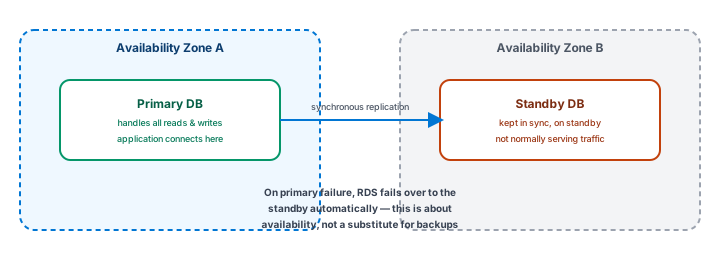
If the primary fails, RDS can fail over to the standby automatically, keeping the application reachable with minimal interruption. Notice what this does not do: it doesn't protect against bad data being written — a mistaken deletion or a corrupting bug reaches the standby too, since it's kept in sync with the primary. That's exactly why availability and backups are separate concerns, addressed separately, not one covering for the other.
Read replica ≠ Backup
A read replica is a separate, read-only copy of a database, kept in sync with the primary, used to handle additional read traffic (queries) without adding load to the primary instance. This is a scaling tool, not a backup: a read replica is continuously kept in sync with the primary, so it faithfully reflects the primary's current state — including any mistake or corruption the primary picks up. A read replica does not give you a way to go back to an earlier point in time the way a backup does; it exists to spread out read load, not to protect against data loss.
Scaling: handling more load
Scaling a database generally means growing its capacity to handle more traffic or more data. Two broad approaches show up repeatedly across AWS's database services:
- Vertical scaling — increasing the capacity of a single database instance (more compute, more memory).
- Horizontal scaling (for reads) — adding read replicas to spread out read traffic, as introduced above.
Which approach applies, and how far it goes, depends on the specific database service and engine — this lesson introduces the concepts rather than a specific service's exact scaling limits, since those details change as AWS evolves each service.
Putting the three concepts together
A well-thought-out production database deployment usually addresses all three deliberately, as separate concerns: backups (recover from data loss or a mistake), high availability (stay reachable through infrastructure failure), and scaling (handle growing load) — rather than assuming that solving one of them quietly solves the other two as well.
Exercise
A team enables a Multi-AZ deployment for their RDS database and tells stakeholders "we're covered, we don't need backups anymore." Using this lesson's distinctions, explain what's wrong with that statement, and describe one failure scenario a Multi-AZ setup would NOT protect against.
Show hint
Think about a mistake in the data itself, rather than a hardware or Availability Zone failure.
Backups, Availability, and Scaling Quiz
My Notes
Log in to keep private notes on this lesson.
Questions about this lesson
No questions yet — be the first to ask.
Log in to ask a question about this lesson.
Summary
Backups, high availability, and scaling solve three different problems — recovering from data loss, staying reachable through a failure, and handling more load — and treating any one of them as automatically covering the others is a genuinely consequential mistake, not a minor simplification.