Load Balancing Basics
By the end of this lesson, you'll be able to:
- Explain what a load balancer does and why distributing traffic across multiple targets matters
- Describe the health check concept at a beginner level
- Explain how a load balancer supports a multi-AZ design for resiliency
Prerequisites: "DNS and Amazon Route 53"
Why spread traffic across more than one target
Sending every request to a single EC2 instance creates two problems at once: that one instance becomes a performance bottleneck as traffic grows, and it becomes a single point of failure — if it goes down, the whole application goes down with it. A load balancer sits in front of multiple targets and distributes incoming traffic across them, directly addressing both problems.
Health checks: only send traffic to targets that are actually working
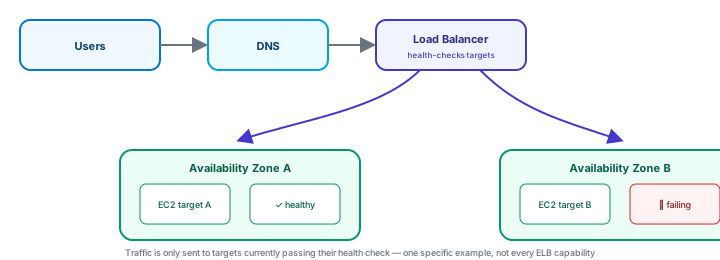
A load balancer performs health checks against each target — periodically confirming a target is actually responding correctly — and stops sending it new traffic if it fails those checks, resuming once it recovers. This means one unhealthy target doesn't take down the application for users; the load balancer routes around it automatically.
Multi-AZ: resiliency, tying back to Module 1 and Module 5
Placing targets in more than one Availability Zone — the same AZ concept from Module 1, and the same reasoning Module 5 used for RDS Multi-AZ — means an entire AZ having a problem doesn't take down every target at once. A load balancer distributing traffic across targets in AZ A and AZ B is this exact pattern, applied to compute instead of a database.
AWS offers more than one type of load balancer, each suited to different traffic patterns — this lesson deliberately doesn't require memorizing every type or feature; the beginner-level goal is understanding why a load balancer belongs in an architecture at all, and what problem it solves.
Exercise
An application currently runs on a single EC2 instance with no load balancer. Explain two distinct problems this creates, and how introducing a load balancer with targets in two Availability Zones addresses each one.
Show hint
One problem is about handling more traffic; the other is about what happens if that one instance fails.
Load Balancing Basics Quiz
My Notes
Log in to keep private notes on this lesson.
Questions about this lesson
No questions yet — be the first to ask.
Log in to ask a question about this lesson.
Summary
A load balancer distributes incoming traffic across multiple targets rather than sending it all to one resource, using health checks to avoid sending traffic to a target that isn't responding correctly, which together support spreading an application across multiple Availability Zones for resiliency.