CloudWatch Alarms
By the end of this lesson, you'll be able to:
- Explain how a CloudWatch alarm evaluates a metric against a condition
- Explain why an alarm signals a problem but does not fix it
- Explain why alarm thresholds should reflect actual workload behavior rather than a universal number
Prerequisites: "Amazon CloudWatch: Logs and Metrics"
From a metric to a signal someone can act on
Lesson 1 established that metrics let you notice a change. A CloudWatch alarm is what turns that into an actual signal: it continuously evaluates a metric against a configured threshold or condition, and changes state when that condition is met — for example, moving from "OK" to "in alarm."
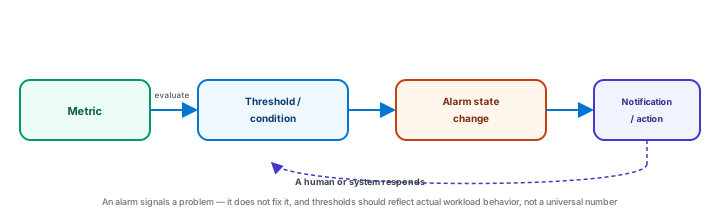
An alarm state change still needs a response process
This is worth stating directly: an alarm changing state does not, by itself, resolve anything. It can trigger a notification (an email, a page to an on-call engineer) or an automated action, depending on how it's configured — but somewhere downstream, a human or a system still has to actually investigate and respond. Monitoring without a response process behind it is really just noise nobody acts on.
Thresholds reflect the workload — there is no universal number
It would be a mistake to memorize a rule like "CPU utilization above 80% is always bad." Whether a given value is a genuine problem depends entirely on the specific workload's normal behavior and the team's actual operational objectives — an application that regularly and harmlessly runs at 85% CPU under normal load would generate constant, meaningless alarms under an 80% threshold, while a different, more bursty workload might need a much lower threshold to catch a real problem early enough to matter. Setting a meaningful threshold means understanding what "normal" actually looks like for that specific application first.
Exercise
A team sets a CloudWatch alarm that fires whenever CPU utilization exceeds 50%, copied directly from a blog post about a completely different application. Within a day, the alarm has fired dozens of times, and the on-call engineer has started ignoring it. Using this lesson's reasoning, explain what went wrong with how the threshold was chosen, and what should have been done instead.
Show hint
The threshold was copied from someone else's workload instead of being based on this application's own normal behavior.
CloudWatch Alarms Quiz
My Notes
Log in to keep private notes on this lesson.
Questions about this lesson
No questions yet — be the first to ask.
Log in to ask a question about this lesson.
Summary
A CloudWatch alarm evaluates a metric against a configured threshold or condition, changing state when that condition is met and triggering a notification or operational action — but the alarm itself never fixes the underlying problem, and a meaningful threshold has to reflect the specific workload's actual behavior rather than a number treated as universally correct.