Deploying and Updating Stacks
By the end of this lesson, you'll be able to:
- Trace what happens when a stack is updated from a changed template
- Explain why a seemingly small template change can sometimes cause resource replacement rather than an in-place update
- Explain configuration drift and why out-of-band manual changes make an IaC-managed environment harder to reason about
Prerequisites: "Managing Resource Dependencies"
Updating a stack: change the template, not the resource
The IaC discipline this module has built up has one clear implication for making a change: you change the template, not the running resource. Updating a stack means submitting a changed template, and letting CloudFormation compare it against the stack's current state and apply whatever changes are needed.
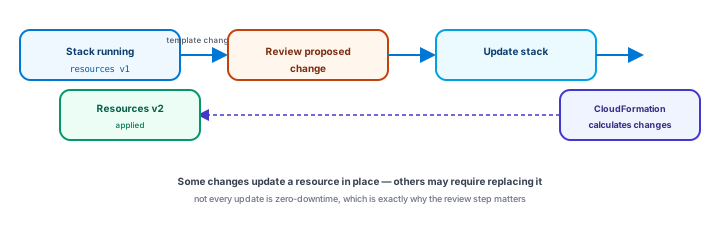
Reviewing a proposed change before it happens
Before applying a change to a real stack, CloudFormation can show a preview of the proposed change — what would actually happen if the update were applied. Reviewing this before deploying matters especially because a seemingly small template edit can sometimes cause a resource to be replaced rather than updated in place — deleted and recreated, rather than modified as-is. For a stateless resource that might be a non-event; for something holding real data, an unreviewed replacement could mean real data loss. This lesson deliberately avoids listing which specific property changes always cause replacement for which resource types — that behavior is a service-specific detail that can evolve, and the safe habit is reviewing the actual proposed change every time, not memorizing a fixed list.
When something fails: rollback and stack events
If a resource operation fails partway through a deployment, CloudFormation may perform rollback or recovery behavior depending on the specific operation and configuration — but this shouldn't be oversimplified as "everything always returns perfectly to exactly how it was." Stack events are the practical place to actually understand what happened — showing resource creation, updates, and failures as they occur — and reviewing them after any failure is a better habit than assuming a rollback fully undid every effect on its own.
Configuration drift: when reality stops matching the template
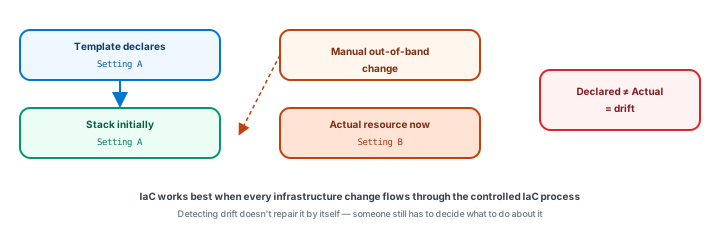
Configuration drift happens when someone manually changes a resource that a stack manages — directly in the Console, say — so the resource's actual state no longer matches what the template declares. This makes the environment genuinely harder to reason about: the template no longer accurately describes reality, and the next stack update might behave unexpectedly because CloudFormation's understanding of the resource's current state has fallen out of sync with what's actually there. The practical habit this lesson leaves you with: make infrastructure changes through the template and a stack update, not by hand against a stack-managed resource — exactly the same discipline Module 9 taught for redeploying a container instead of patching one directly.
Deleting a stack: not automatically safe
Deleting a stack can delete every resource it manages — but depending on a resource's configuration, some data might be retained rather than deleted outright, and some might not be. Before deleting any real stack, review what it actually manages, what data it holds, whether backups exist, and what each resource's deletion behavior is configured to do — the same "verify, don't assume" discipline this course has applied to every earlier module's cleanup step, now applied at the level of an entire stack instead of one resource at a time.
Version control tracks the template — not the deployed state
One more distinction worth being precise about: version-controlling a template gives you history, review, and the ability to revert the template's source — but reverting a Git commit does not automatically revert already-deployed AWS infrastructure. A stack only changes when a new deployment actually runs against it. Reverting the source and forgetting to redeploy leaves the real infrastructure exactly where it was, quietly out of sync with what the reverted template now says.
Exercise
A stack update's proposed change indicates that a database-like resource may be replaced rather than updated in place. Using this lesson's reasoning, explain what you should do before approving that update, and why simply proceeding without reviewing it could be risky. Then explain why reverting a Git commit for a template is not, by itself, enough to undo a change already deployed to a real stack.
Show hint
For the first part, think about what "replaced" could mean for a resource holding real data. For the second, think about what actually triggers a change to deployed infrastructure.
Deploying and Updating Stacks Quiz
My Notes
Log in to keep private notes on this lesson.
Questions about this lesson
No questions yet — be the first to ask.
Log in to ask a question about this lesson.
Summary
Updating a stack means changing its template and letting CloudFormation calculate and apply the necessary changes to bring resources in line with it — a process worth reviewing before it runs, since some changes update a resource in place while others may replace it entirely, and manual, out-of-band changes to a stack-managed resource create configuration drift, where the declared template no longer matches what's actually deployed.