Project: Deploy Infrastructure from Code
By the end of this lesson, you'll be able to:
- Design a small CloudFormation template applying every concept from this module
- Explain why each part of the template and the delivery workflow is structured the way it is
- Apply this module's Cost & Cleanup discipline to a stack-based training project
Prerequisites: "Deploying and Updating Stacks"
This project is a design exercise
As with every hands-on project in this course, you can design this entirely on paper, or build it in a real AWS account if you choose to, following the same two-valid-paths pattern every earlier project has used. QuarryDev does not deploy real production infrastructure as part of this course.
The scenario: a QuarryDev Training Environment as code
A fictional training environment needs, at minimum, a place to receive uploaded files and a queue for background processing — built from a single, reusable template rather than by hand:
AWSTemplateFormatVersion: '2010-09-09'

Description: QuarryDev training environment

Parameters:
  EnvironmentName:
    Type: String
    Default: training

Resources:
  TrainingBucket:
    Type: AWS::S3::Bucket

  TrainingQueue:
    Type: AWS::SQS::Queue

Outputs:
  QueueUrl:
    Value: !Ref TrainingQueue
This deliberately reuses Lesson 2 and Lesson 3's exact fictional resources — the point of this project isn't introducing new services, it's practicing how they fit together as one coherent, deployable template.
Explaining every part, and why it's structured this way
Work through this template and be able to justify each part:
- The template is the definition; deploying it creates a stack (Lesson 2) — nothing exists as real AWS resources until that happens.
EnvironmentNameis a Parameter (Lesson 3), letting this exact template be reused for a second environment later, without editing the resources themselves.TrainingBucketandTrainingQueueare the template's Resources (Lesson 2) — the actual infrastructure, built on Module 4's S3 and Module 8's SQS concepts respectively.QueueUrlis an Output (Lesson 3), exposing a genuinely useful value — deliberately never a secret, following that lesson's explicit warning.- References and dependencies (Lesson 4): a more complete version of this template would likely have an IAM role referencing the bucket and queue by their identifiers, and CloudFormation would infer the ordering from those references automatically, without needing an explicit dependency declaration for that case.
- Security: any IAM role this template creates should grant only the specific permissions the training workload needs (Module 2, Module 10) — never
AdministratorAccessor a wildcard policy. - Secrets: nothing in this template — not a parameter, not an output — ever contains a real credential (Module 10, reinforced in Lesson 3).
- Updates and replacement risk (Lesson 5): a future change to this template should go through review and a change preview before being applied, especially if it touches the bucket, since data-holding resources deserve extra scrutiny before any change that might replace them.
- Drift (Lesson 5): once deployed, changes to this environment should go through updating the template again — not a manual Console edit to the deployed bucket or queue.
The delivery workflow, conceptually
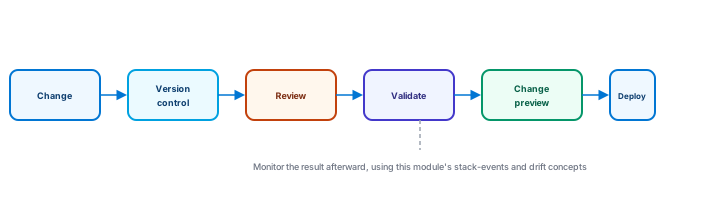
Applied to this project: a change to the template (adding a resource, adjusting a parameter default) goes to version control, gets reviewed, is validated, has its proposed change previewed, is deployed, and is then monitored afterward using this module's stack-events and drift concepts.
Cost & Cleanup
If any part of this was built in a real account, work through this checklist before considering the project finished:
- Inspect what the stack actually manages — review the stack's resources directly rather than assuming you remember every one.
- Protect or back up any real data in the training bucket, if it holds anything worth keeping, before deleting anything.
- Understand each resource's deletion behavior — some configurations retain certain resources (or their data) even after the stack itself is deleted; confirm what actually happens for this specific stack before deleting it.
- Delete the training stack once you're confident it's no longer needed and the above has been reviewed.
- Verify cleanup by checking the CloudFormation console (or the individual S3/SQS dashboards) directly, rather than assuming the deletion fully succeeded.
- Check for anything intentionally retained outside the stack — a resource configured to survive stack deletion doesn't disappear on its own and still needs its own explicit review.
Exercise
For the QuarryDev Training Environment template: (1) what would deploying this template for the first time actually create, and what wouldn't exist before that? (2) if you needed a second, separate environment using this same template, what would you change, and what wouldn't need to change? (3) why does the QueueUrl output not raise the same concern a hypothetical "DatabasePassword" output would? (4) walk through the cleanup checklist for this specific stack, explaining why step order matters.
Show hint
Revisit Lesson 2 for (1), Lesson 3 for (2) and (3), and this lesson's Cost & Cleanup section for (4).
Project: Deploy Infrastructure from Code Quiz
My Notes
Log in to keep private notes on this lesson.
Questions about this lesson
No questions yet — be the first to ask.
Log in to ask a question about this lesson.
Summary
This closing project ties the whole module together into one design exercise — a QuarryDev Training Environment defined as a small CloudFormation template with a parameter, a few fictional resources, and an output — worked through as a conceptual delivery workflow from a template change to a monitored deployment, with a full Cost & Cleanup checklist for anyone who builds this in a real account.