Auto Scaling Groups
By the end of this lesson, you'll be able to:
- Distinguish vertical scaling from horizontal scaling, including a genuine trade-off of each
- Explain how an Auto Scaling Group adds elasticity to a fleet of application instances
- Explain why horizontal scaling depends on the application tier being stateless
Prerequisites: "Fault Tolerance and Load Balancing"
Vertical versus horizontal scaling
Vertical scaling means increasing the capacity of a single resource — a bigger instance type, more CPU, more memory. It's simple to reason about, but it has a real ceiling (there's always a largest available instance type) and typically requires some interruption to resize. Horizontal scaling means adding more instances, tasks, or workers to share the load instead. It scales further in principle, and — done well — can add or remove capacity without any single interruption, but it depends on the workload being genuinely shareable across multiple instances in the first place.
Neither is universally better: a workload that genuinely needs one particularly powerful resource (not easily split across many smaller ones) may lean vertical; a workload that can be split across interchangeable units, and that needs to handle unpredictable or spiky demand, leans horizontal.
Auto Scaling Groups: automating horizontal scaling
An Auto Scaling Group (ASG) automates horizontal scaling for a fleet of instances — adjusting how many are running based on configured conditions, adding capacity as demand increases and removing it as demand falls, without someone manually launching or terminating instances. This is exactly what turns a merely scalable design (Lesson 1's distinction) into an elastic one: capacity now adjusts automatically, rather than requiring manual intervention every time load changes.
This lesson deliberately doesn't dictate specific scaling thresholds or policies as universal defaults — what triggers scaling in a real ASG should reflect the specific workload's actual behavior, the same "no universal number" reasoning Module 10 applied to CloudWatch alarm thresholds.
Why horizontal scaling needs a stateless application tier
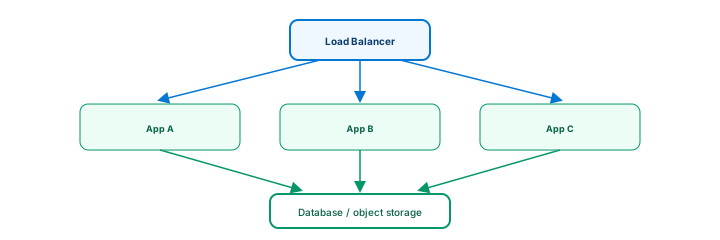
An Auto Scaling Group can only add and remove instances safely if none of them hold data that would be lost when they're terminated — this is what it means for an application tier to be stateless: any request can be handled by any interchangeable instance, because durable state lives elsewhere (a database, S3, or another appropriate persistent store), not on the instance's own local disk or memory. This connects directly to Module 9's warning that a container's local filesystem is not durable storage, and Module 7's identical warning for Lambda's execution environment — the same principle, now framed as a scaling requirement rather than a durability warning.
This doesn't mean everything should be stateless — a database is inherently about durable state, and that's exactly its job. The principle applies specifically to the tier you want to scale horizontally and replace freely: keep it stateless, and push anything that must persist into a service actually designed to hold it.
Exercise
An application's instances currently store uploaded user files on their own local disk, and the team wants to add an Auto Scaling Group so the fleet can grow and shrink with demand. Using this lesson's reasoning, explain what problem this current design creates for Auto Scaling specifically, and what change would need to happen first before Auto Scaling could work safely.
Show hint
Think about what happens to a locally-stored file when the instance that stored it is scaled in and terminated.
Auto Scaling Groups Quiz
My Notes
Log in to keep private notes on this lesson.
Questions about this lesson
No questions yet — be the first to ask.
Log in to ask a question about this lesson.
Summary
Vertical scaling increases the capacity of one resource, while horizontal scaling adds more instances or tasks to share the load — an Auto Scaling Group automates horizontal scaling by adjusting the number of running instances to match demand, which only works cleanly when the application tier is stateless, so that any instance can be added, removed, or replaced without losing anything that matters.