Amazon SQS: Queues
By the end of this lesson, you'll be able to:
- Explain what Amazon SQS provides and the producer/queue/consumer shape it's built around
- Explain the visibility timeout and why it can lead to duplicate message processing
- Explain what a dead-letter queue is for, and why it needs monitoring rather than being ignored
Prerequisites: "Why Application Integration Matters: Decoupling Systems"
SQS: a managed queue between a producer and a consumer
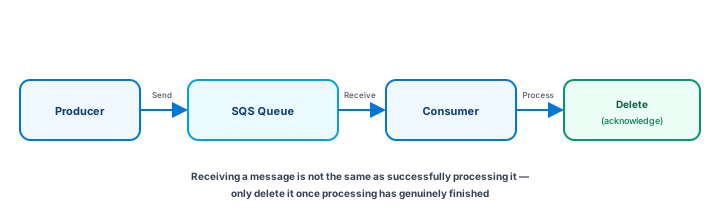
Amazon SQS (Simple Queue Service) is a managed message queue. A producer sends a message to a queue; the queue holds it until a consumer is ready to receive and process it. A realistic example: a web application receives an order and needs to generate a detailed report — instead of making the user wait for that report to finish, the application sends a message to SQS and returns a response immediately, while a background worker picks up the message and generates the report separately.
The visibility timeout: why duplicates can happen
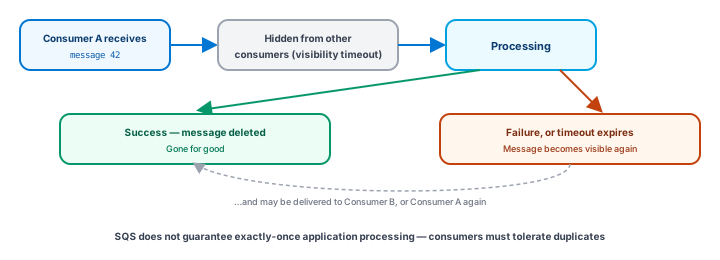
When a consumer receives a message, SQS doesn't delete it right away — it becomes temporarily hidden from other consumers for a configured period called the visibility timeout, giving that consumer time to process it. If the consumer finishes and deletes the message before the timeout expires, it's gone for good. But if the consumer crashes, takes too long, or otherwise never deletes it in time, the message becomes visible again — and can be delivered to another consumer, or the same one again.
Standard versus FIFO, at a beginner level
SQS offers more than one queue type, differing in the ordering and duplicate-handling guarantees they provide:
- A standard queue is designed for high-scale message throughput; message order isn't guaranteed, and the application's own design (idempotency, in particular) needs to account for possible duplicates.
- A FIFO queue provides ordering and deduplication capabilities for use cases that specifically require them, subject to the service's own defined semantics.
This lesson deliberately doesn't quote current throughput limits for either type — those are platform details worth checking against AWS's own current documentation. The durable point: even a queue type built for ordering or deduplication doesn't remove the need for careful consumer design — a correctly-built idempotent consumer remains the safest default regardless of queue type.
Dead-letter queues: isolating messages that keep failing
Sometimes a message fails processing repeatedly — a malformed message, a bug triggered only by specific data, or a downstream dependency that's persistently broken for that one case. A dead-letter queue (DLQ) is a separate queue configured to receive a message after it has failed processing a defined number of times, instead of letting it retry forever and potentially block or slow down processing of everything else.
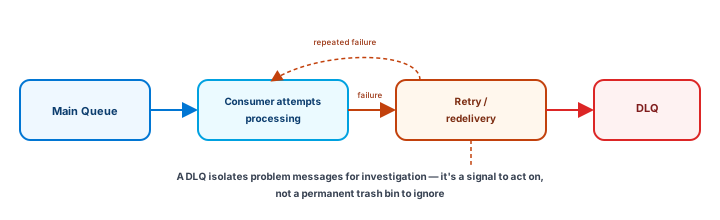
A DLQ with messages in it should be treated as something to actively monitor and investigate — the messages inside it usually point at a real bug or a real data problem worth fixing, not noise to suppress.
Exercise
A worker receives an SQS message, begins processing it, and crashes halfway through — before deleting it. Using this lesson's concepts: (1) what happens to that message after the visibility timeout expires, and (2) what should the application's design account for as a result? (3) Separately, a specific message has now failed processing five times in a row. What AWS feature exists for exactly this situation, and what should NOT be done with it once the message lands there?
Show hint
For (1)-(2), think about redelivery and idempotency. For (3), the answer is the dead-letter queue — and the wrong response is ignoring it.
Amazon SQS: Queues Quiz
My Notes
Log in to keep private notes on this lesson.
Questions about this lesson
No questions yet — be the first to ask.
Log in to ask a question about this lesson.
Summary
Amazon SQS is a managed message queue: a producer sends messages, a queue holds them until a consumer is ready, and the consumer must explicitly delete a message after successfully processing it — the visibility timeout hides a received message from other consumers only temporarily, which is why consumers must be designed to tolerate a message being delivered more than once, and a dead-letter queue isolates messages that fail processing repeatedly.